
Quick Summary
- 1.Most disconnections come from battery saving, not the VPN
- 2.Set the VPN app's battery use to Unrestricted and allow background data
- 3.Turn on Always-on VPN so Android reconnects it for you
- 4.Set Private DNS to Automatic and remove other VPN apps
VPN on Android › Keeps disconnecting
Why Your VPN Keeps Disconnecting
A VPN keeps a connection open in the background all day. Android, and every phone brand's own battery saving on top of it, is designed to stop apps doing exactly that. So when a VPN drops while the phone is in your pocket, the usual cause is that the phone paused or closed it, not that the VPN failed.
The rest are network changes (Wi-Fi to mobile data, a weak signal), another app taking over the VPN slot, and DNS settings that clash with the VPN.
8 Fixes, in Order
Paths below are for Pixel and phones close to stock Android. On other brands the names differ slightly; if a setting isn't where we say, use the search box at the top of Settings. Screenshots are from stock Android 16; see VPN on Google Pixel for the full walkthrough.
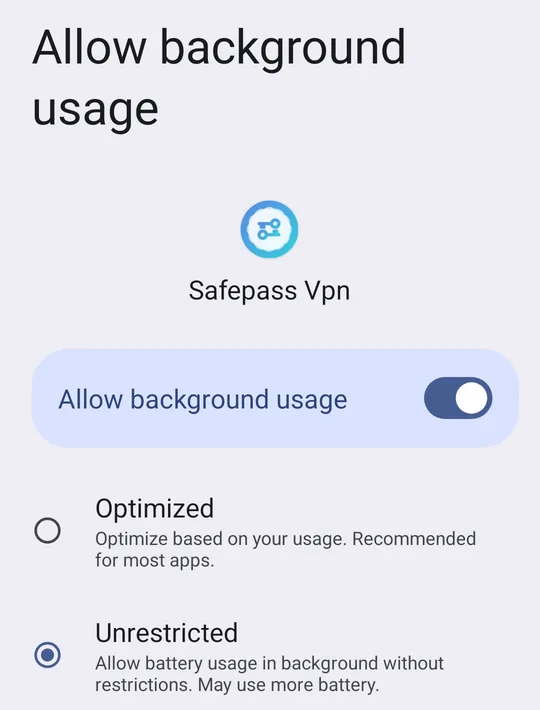
1. Set the VPN app's battery use to Unrestricted
SettingsAppsSafepass VpnApp battery usageAllow background usageUnrestricted
This is the fix for most people. Android's battery optimisation pauses apps you aren't looking at, and a VPN works entirely in the background. On Android 14 and newer, Unrestricted sits under Allow background usage; on older versions the option is called Battery rather than App battery usage. Samsung and Vivo add extra settings on top; see battery settings by brand below.
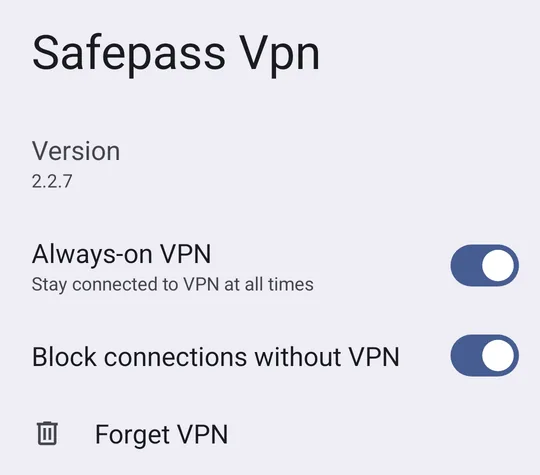
2. Turn on Always-on VPN
SettingsNetwork & internetVPN⚙ next to Safepass Vpn
Android then starts the VPN when the phone boots and brings it back after a network change or if the app is closed. Read the full Always-on VPN guide.
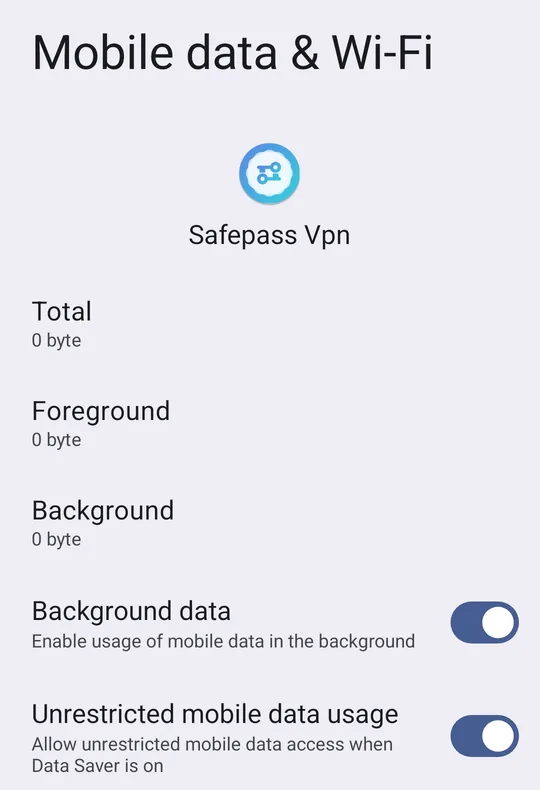
3. Allow background data
SettingsAppsSafepass VpnMobile data usage
Turn on Background data, and Unrestricted mobile data usage if you see it. Without them, Data Saver can cut the VPN's connection whenever the screen is off.
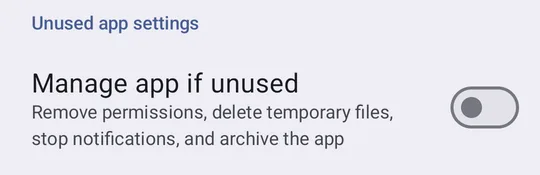
4. Stop Android pausing the app when unused
SettingsAppsSafepass VpnManage app if unused
Turn it off. Older versions call it Pause app activity if unused. Android 11 and newer remove permissions from apps you haven't opened for a few months, and an always-on VPN is an app you rarely open.
5. Set Private DNS to Automatic
SettingsNetwork & internetPrivate DNSAutomatic
A custom Private DNS hostname can clash with the VPN's own DNS, so the VPN looks connected but nothing loads, and apps reconnect again and again. Our Private DNS guide explains when a hostname is worth keeping.
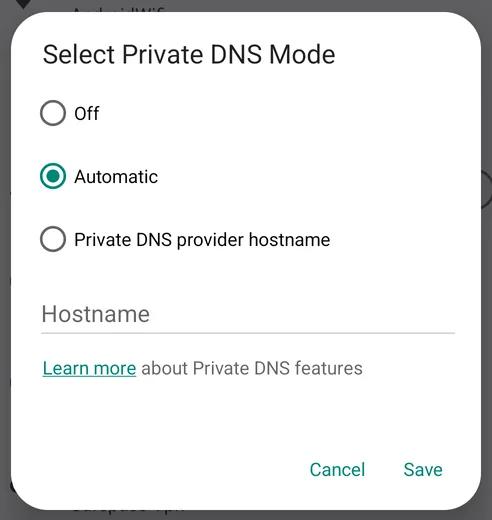
6. Remove other VPN apps
Android runs one VPN at a time. Another VPN, an ad blocker that works as a VPN, or a built-in service like Samsung's Secure Wi-Fi takes over the connection and quietly disconnects yours. Turn off or uninstall the ones you don't use.
7. Watch out for weak or changing networks
Every switch between Wi-Fi and mobile data, and every drop in a weak signal, briefly breaks the tunnel. The WireGuard protocol SafePassVpn uses reconnects quickly, but on a Wi-Fi network that keeps dropping it's often better to turn Wi-Fi off and use mobile data.
8. Check your plan's data
SafePassVpn's free plan includes a daily data allowance, and the connection ends once it's used up. The app shows what's left for today; Premium has no data limit.
Battery Settings by Brand
Some brands add their own battery saving on top of Android's. These are the settings we found on real phones:
Samsung Galaxy (One UI)
Set the app's battery use to Unrestricted
SettingsAppsSafepass VpnBatteryUnrestricted
Add it to Never auto sleeping apps
SettingsBatteryBackground usage limitsNever auto sleeping apps
Allow background data
SettingsAppsSafepass VpnMobile data
Know what Device care does
SettingsDevice careAuto optimisation
Full walkthrough with screenshots: VPN on Samsung Galaxy.
Vivo (Funtouch OS)
Allow high background power use
SettingsBatteryHigh background power consumptionSafepass Vpn
Allow Autostart
SettingsApplications and PermissionsPermission managementAutostartSafepass Vpn
Check the app can use mobile data and Wi-Fi
SettingsApplications and PermissionsApp managerSafepass VpnData usage
Full walkthrough with screenshots: VPN on Vivo.
Xiaomi, Oppo, Realme and OnePlus phones have similar Autostart and battery saver settings. Search Settings for autostart or battery and allow the VPN app to run in the background.
Still Disconnecting?
Check the connection itself with our ping test: high packet loss means the network, not the VPN, is dropping. Connecting to the nearest server it finds also helps. Then confirm the VPN is really on with What Is My IP. The address should be the VPN server's, not your own.
If none of this helps, contact us from the help center with your phone model and Android version.
VPN Disconnecting FAQs
Quick answers for Android VPN drop-outs.
A VPN Built to Stay Connected
SafePassVpn uses WireGuard, which reconnects quickly when your network changes. Free plan with daily data and 3 locations, no sign-up.