
Quick Summary
- 1.Install a VPN app, connect once, and accept Android's VPN permission prompt
- 2.Most disconnections are caused by battery saving, not the VPN
- 3.Always-on VPN reconnects automatically after restarts and network changes
- 4.Android runs one VPN at a time
Guides by Phone Brand
Each guide is written from the actual settings screens: where the VPN settings are, which battery settings close VPN apps, and the problems specific to that brand. We add brands as we test them.
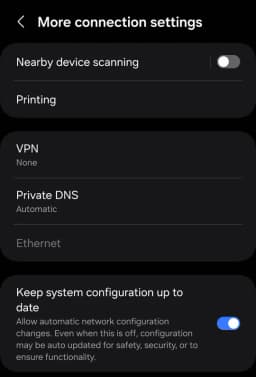
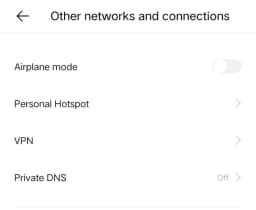
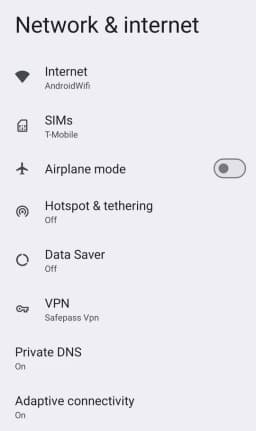
Find the VPN Settings on Any Android Phone
The VPN screen lists the VPN apps you've connected and any profiles you've added by hand. It sits under the network or connections section of Settings, but the exact path changes from brand to brand. The quickest way on any phone is to open Settings, tap the search box and type VPN.
You don't need this screen to use SafePassVpn: install the app, tap the power button, and accept the permission prompt Android shows the first time. You only need it for Always-on VPN, below.
Why VPNs Disconnect on Android
A VPN works in the background, and every phone brand adds its own battery saving on top of Android's. When the phone decides an app isn't being used, it can pause it, cut its network access or close it. For a VPN, that means a silent disconnection. The fix is the same idea on every phone:
- Set the VPN app's battery use to unrestricted (or the brand's equivalent)
- Exclude it from any sleeping-apps, app-freezing or auto-clean feature
- Allow it to use data in the background and while data saver is on
- Turn on Always-on VPN so it comes back after a restart
The brand guides above show where each of these lives on your phone. For every cause and fix in one place, read VPN keeps disconnecting on Android.
Always-on VPN
Always-on VPN is part of Android itself, so it works with SafePassVpn's free plan. Open the VPN settings screen, tap the gear next to SafePassVpn and turn on Always-on VPN. Adding Block connections without VPN stops apps reaching the internet while the VPN is reconnecting. Our Always-on VPN guide covers what to do if the switch is missing, and the Private DNS guide explains the DNS setting next to it.
New to VPNs? Read what a VPN is and how it works, or see what our free Android VPN includes.
Android VPN FAQs
Quick answers that apply to every Android phone.
Get SafePassVpn for Android
Free plan with daily data and 3 locations, no sign-up. Premium adds 9+ locations, unlimited data and split tunneling.