
Quick Summary
- 1.Settings → Network & internet → VPN → ⚙ next to the VPN app → Always-on VPN
- 2.Android starts the VPN at boot and reconnects it after network changes
- 3.Block connections without VPN stops all traffic while the VPN is down
- 4.Works with any VPN app that supports it, including SafePassVpn's free plan
VPN on Android › Always-on VPN
What Always-on VPN Does
Always-on VPN has been part of Android since version 7. When it's on for a VPN app, Android itself keeps that VPN running:
- It starts the VPN as soon as the phone boots, before you open any app
- It reconnects the VPN after you switch between Wi-Fi and mobile data
- It restarts the VPN if the app is closed in the background
It's the single most useful setting if your VPN keeps disconnecting.
How to Turn On Always-on VPN
Connect your VPN app once first, so it appears in the list. Then:
Pixel and phones close to stock Android
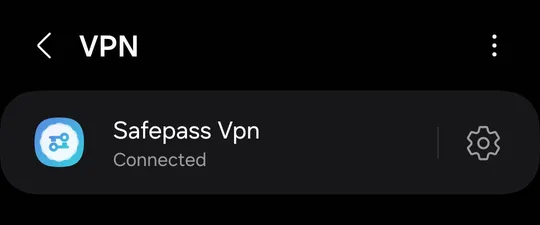
SettingsNetwork & internetVPN⚙ next to Safepass Vpn

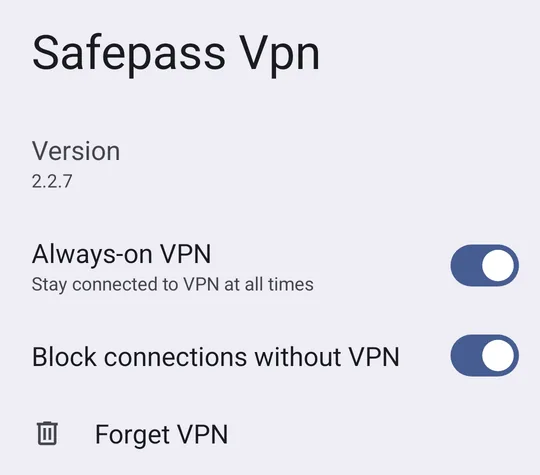
More Pixel settings that keep the VPN on: VPN on Google Pixel.
Samsung Galaxy (One UI)
SettingsConnectionsMore connection settingsVPN⚙ next to Safepass Vpn
Vivo (Funtouch OS)
Not available on the Vivo Y15 we tested. See the Vivo guide for what to do instead.
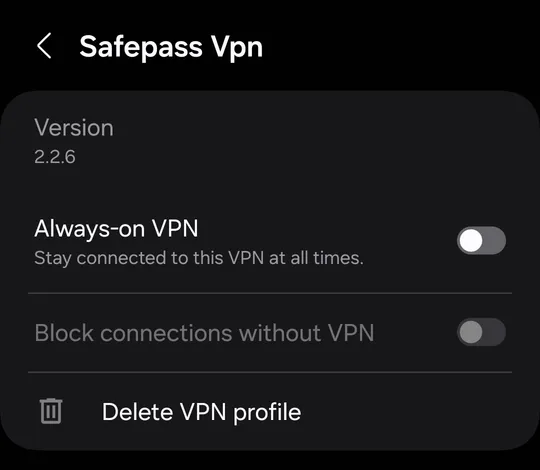
Turn on Always-on VPN. The VPN connects and stays on.
On a Samsung Galaxy it looks like this:
Block Connections Without VPN
Under Always-on VPN there's a second switch, Block connections without VPN. It stays greyed out until Always-on VPN is on.
With it on, no app can reach the internet unless the VPN is connected. If the VPN drops or is reconnecting, traffic stops instead of going out over your normal connection. That's what you want on public Wi-Fi.
The catch is Wi-Fi sign-in pages in hotels, airports and cafés: they need a connection before the VPN can connect, so they won't open. Turn this one switch off, sign in, then turn it back on.
Always-on VPN Missing or Greyed Out
There's no gear next to the VPN
Some phone brands hide it. On our Vivo test phone there was no gear and no Always-on VPN at all. In that case, battery and Autostart settings do the same job. See our Vivo guide.
The switch is greyed out
Either the VPN app doesn't support Always-on VPN, or the phone is managed by a work or school profile that controls VPN settings. Check with your IT team for a work phone.
Another VPN keeps taking over
Only one app can be the always-on VPN. If another VPN is set as always-on, turn it off there first.
Always-on VPN vs a VPN Kill Switch
Block connections without VPN works like a kill switch for the whole phone, and because it's built into Android it works on SafePassVpn's free plan and on SafePassVpn Premium. Some VPN apps add their own kill switch inside the app; on Android, the system setting does the same job for every app.
Once it's on, check it's working: What Is My IP should show the VPN server's address, and the DNS leak test should show no servers from your own provider.
Always-on VPN FAQs
Short answers about Android's Always-on VPN.
Get a VPN That Supports Always-on
SafePassVpn works with Android's Always-on VPN and Block connections without VPN on every plan. Free plan with daily data and 3 locations, no sign-up.